
 PEDIF+ · Email and document orchestration
Turn emails and attachments into a controlled data flow.
PEDIF+ captures incoming business messages, assigns emails and attachments to a process, and routes them to the right handling path. Approved recurring PDF layouts go to PEDIF; uncertain cases remain visible for targeted review.
PEDIF+ organizes intake. PEDIF turns approved recurring PDF layouts into structured data.
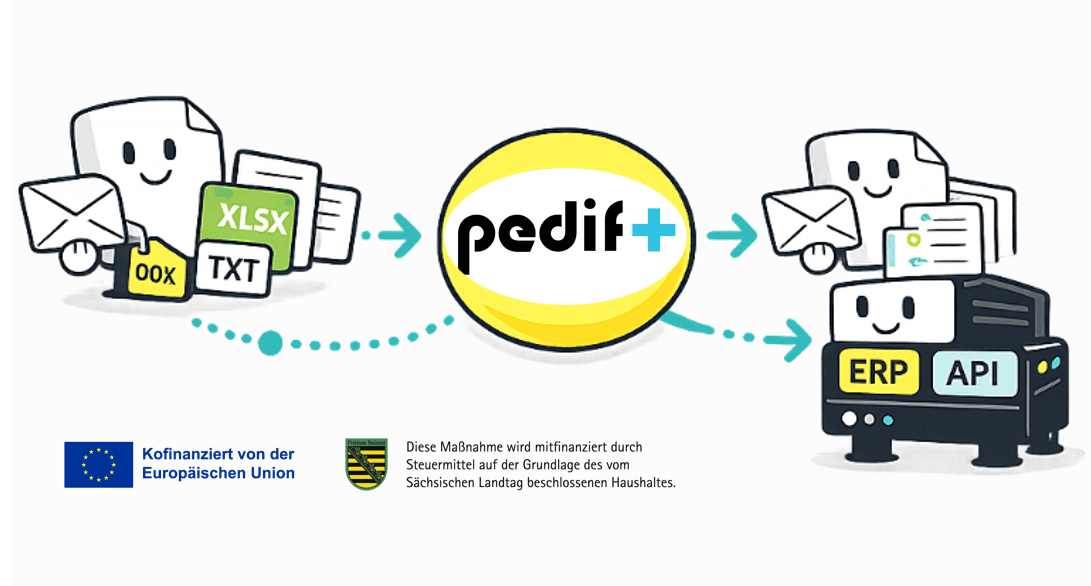
The inbox is digital. The sorting work often is not.
Orders, order confirmations, invoices, delivery notes and other business messages arrive as email text, PDFs, spreadsheets or office attachments. People still need to identify the case, find the relevant file and decide where it belongs.
PEDIF+ works before the core document-processing step. It creates a defined intake and a traceable path for known, uncertain and different types of cases.
Without controlled intake
- Review the inbox manually
- Open attachments one by one
- Identify the case and owner
- Forward or rekey information
With PEDIF+
- Capture the message and attachments
- Classify the business case
- Select the right handling path
- Known PDFs to PEDIF, uncertainty to review
Two jobs, one connected process
PEDIF+ and PEDIF deliberately perform different jobs. Intake stays flexible while precise PDF processing keeps a clearly defined scope.
Capture intake
Mailbox or forwarding: email content, sender context and attachments are captured for the agreed process.
Classify and route
Document type, business case and handling path are assigned. Uncertain cases remain visible and move into controlled review.
Structure PDFs precisely
When a PDF matches an approved recurring layout, PEDIF extracts and validates the agreed fields and prepares the defined target format.
PEDIF+ does not replace PEDIF. PEDIF+ extends intake; PEDIF provides precise processing for approved recurring PDF layouts.
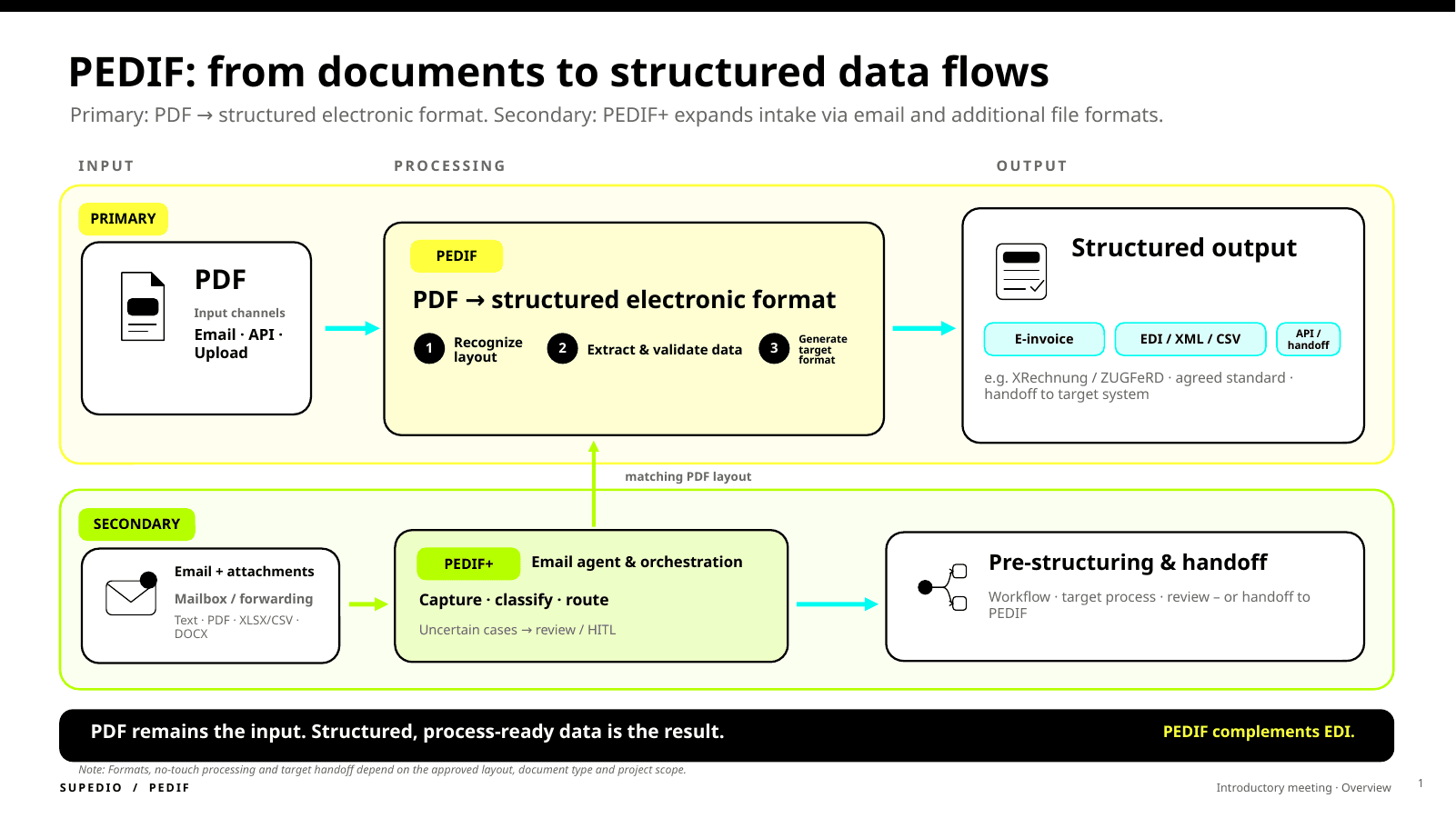
PEDIF remains the precision path for approved recurring PDF layouts. PEDIF+ adds email intake, classification and routing.
In the diagram, “Review / HITL” means targeted human review for uncertain cases only.
From a shared inbox to the right downstream process
- 1
An email arrives
A business message reaches an agreed mailbox or is forwarded into it.
- 2
Capture content and attachments
Email text, sender context and supported attachments are captured as one related business case.
- 3
Determine case and route
PEDIF+ assigns the document type, process and next handling path using the agreed rules.
- 4
Known PDF to PEDIF - uncertainty to review
Approved recurring PDF layouts enter the structured PEDIF path. New, changed or ambiguous cases remain visible.
- 5
Hand off the result
The result is handed to the configured downstream process, such as an ERP, EDI, DMS, API or review workflow, depending on the implementation.
Which inputs can be considered?
The exact scope is defined for each project. Typical inputs include:
Email text
Subject, message body, sender and process context.
PDF attachments
Approved recurring PDF layouts can be handed to PEDIF for structured processing.
XLSX and CSV
Spreadsheet attachments can be considered for classification, pre-structuring or downstream handoff.
DOCX and other attachments
Office documents and additional formats are handled after a fit check and within the agreed scope.
No any-document guarantee: document types, formats, rules, review cases and downstream handoffs are agreed before use.
Less inbox work without hiding uncertain cases
Less manual screening
Recurring sorting and forwarding work can be reduced in a targeted way.
Clearer ownership
Messages are assigned to a defined case and handling path.
Review only where needed
New, changed or ambiguous cases are intentionally routed for review.
Keep existing channels
Senders can often continue using email and PDF while the downstream process receives a structured handoff.
Operational visibility
Status, routing, exceptions and results can be made visible within the agreed operating context.
Use PEDIF precision where it fits
Known recurring PDF layouts move from general intake into an approved, validated processing path.
Typical PEDIF+ scenarios
Order intake
Identify order emails, assign attachments and hand approved recurring order PDFs to PEDIF.
Finance and invoices
Organize invoice and document inboxes by business case, document type and handling path.
Supply chain and service
Route order confirmations, delivery notes and additional documents in a controlled way.
Software and platform providers
Embed PEDIF+ as an upstream email and document-intake layer within a defined solution scope.
Begin with one clearly bounded email process.
The first step should show what fits, not trigger a major integration project immediately.
- 1
Process check
Define the mailbox, typical messages, attachments, target system and review cases together.
- 2
Registered email test
After registration and agreed data handling, a test with up to 100 real emails can be arranged.
- 3
Result and next step
See which cases can be assigned reliably, where review is needed and whether integration makes sense.
The test is a decision aid, not a promise of blanket fully automated processing.
PEDIF+ is a strong fit when …
- multiple document types arrive in a shared inbox
- people regularly sort, forward or rekey information
- approved recurring PDF layouts need precise processing
- uncertain cases must not be silently automated
- ERP, EDI, DMS or API processes need structured input
Not every incoming message is immediately an automation case. The fit check clarifies document types, layouts, data quality and downstream processes.
Common questions about PEDIF+
What is PEDIF+?
PEDIF+ is the PEDIF-led extension for email and document intake. It captures messages and attachments, classifies the business case and routes it to the right handling path.
Does PEDIF+ replace the core PEDIF processing path?
No. PEDIF+ organizes intake. PEDIF turns approved recurring PDF layouts into structured data for a defined downstream process.
Which file types can PEDIF+ consider?
Typical inputs include email text, PDF, XLSX, CSV and DOCX. The exact scope is agreed by document type, format, rules and downstream process.
What happens to new or uncertain cases?
New, changed or ambiguous cases are not silently treated as safe. They remain visible and can be routed into targeted review.
Does PEDIF+ run fully automatically?
A high degree of automation can be achieved for clearly defined and approved cases. Variable email content and uncertain documents still require a controlled review path.
Does PEDIF+ replace existing EDI processes?
No. PEDIF+ and PEDIF complement existing ERP, EDI, DMS and API processes where business messages still arrive by email or as documents.
How does the email test work?
After registration and agreed data handling, a test with up to 100 real emails can be arranged. It shows classification, routing, known PDF cases and required reviews.
Do I need to upload real emails on this page?
No. The landing page only starts the process assessment. Real messages are used only after registration, an agreed scope and clarified data handling.
Bring order to email intake without giving up precise PDF processing.
We assess one concrete inbox and document process and propose the next sensible step.
No upload is required on this page. Real emails are used only after registration and agreed data handling.